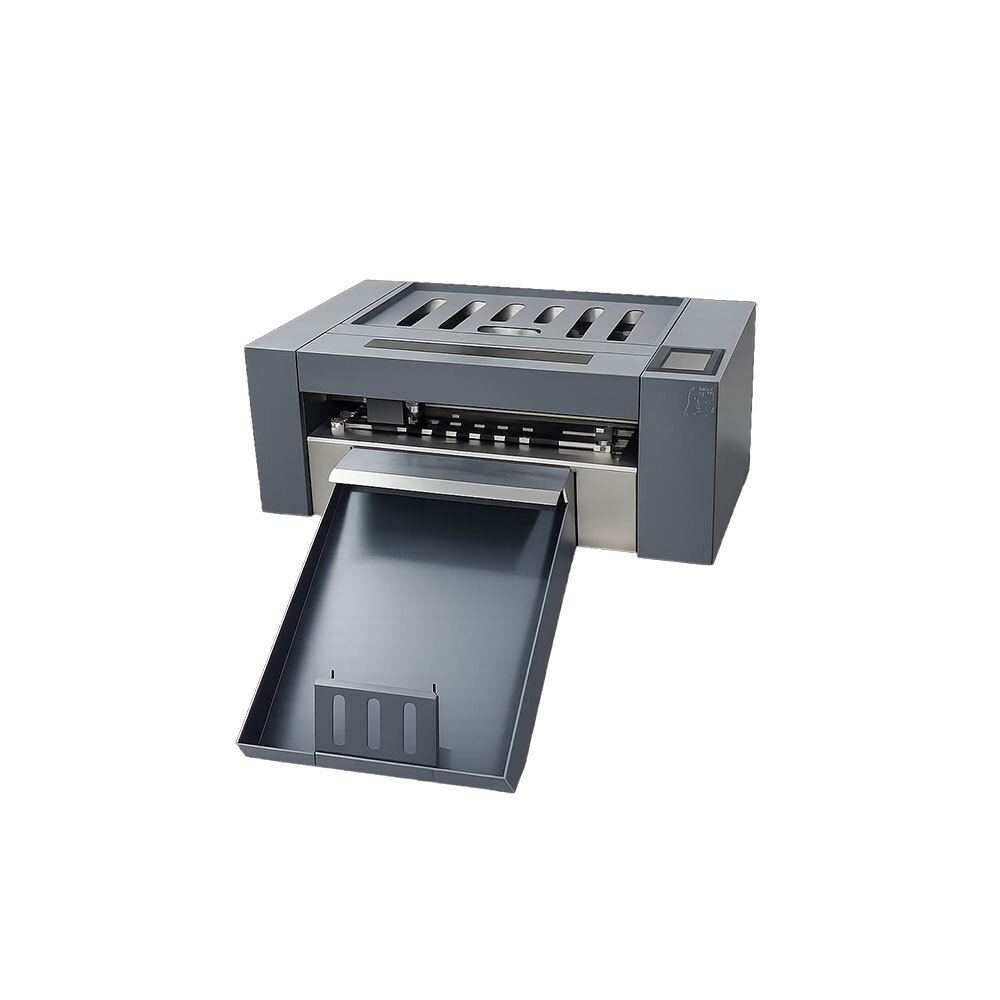
Plotter Cutting Machine About
|
Model
|
DXC330
|
DXS350Pro
|
|
Software Free Plugin
|
CorelDRAW X4-2018/Adobe Illustrator CS6-2017
|
|
Software optional extra purchasing (Support all Model)
|
Signcut
|
|
Max Sheet Size
|
330*488 mm
|
|
Max Cutting Surface
|
325*483 mm
|
|
Max Media Height
|
< 0.5mm or Around 500 gsm
|
|
Packing Size
|
795*445*530 mm
|
795*445*530 mm
|
|
Packing Gross Weight
|
46 kg
|
49.5 kg
|
|
Max Force
|
2000 g
|
|
Number of Heads
|
1
|
|
DXC330
|
|
|
Auto contour cut
|
CCD-Camera
|
|
CorelDRAW and Al Directly
|
220/50
|
|
Power Supply (V/Hz)
|
220/50
|
|
|
Micro Stepper Motor
|
Digital Servo Motor
|
|
Processor Memory
|
128MB
|
|
Cutting Precision
|
-/+ 0.01mm
|
|
Repeat Precision
|
0.082 mm
|
|
Maximum Moving Speed
|
800mm/s
|
1600mm/s
|
|
Max cutting Speed
|
800mm/s
|
|
Connector Interface
|
USB Flash/WIFI/USB Cable/WLAN
|
|
|
< 100W
|
|
Working Environment
|
+5 deg C - +35 deg C
|
Delivering repeat precision of just 0.082 mm, the DXC330 ensures top-tier accuracy for detailed graphics, decals, and specialty cuts. The integrated CCD camera system enables straightforward registration mark detection, making it particularly effective for businesses demanding tight tolerances and intricate designs.
Versatile Connectivity and Software IntegrationEquipped with USB, WIFI, and WLAN interfaces, the DXC330 offers flexible connectivity options to seamlessly fit into modern print shops. It works directly with established graphic software platforms like CorelDRAW and Adobe Illustrator, streamlining the design-to-cut process.
FAQ's of Plotter Cutting Machine:
Q: How does the CCD camera system improve cutting accuracy in the DXC330 plotter?
A: The CCD camera system enables the DXC330 to recognize registration marks on printed materials, allowing for highly accurate contour cutting and eliminating alignment errors, especially when handling complex designs or multi-layered projects.
Q: What types of materials can be cut with a maximum force of 2000g?
A: With its high cutting force of up to 2000 grams, the DXC330 plotter can handle a variety of materials, including cardstock, vinyl, reflective films, light plastics, and paper-based substrates, providing versatility for various cutting assignments.
Q: When should I use the front auto-feed sheet load feature?
A: The front auto-feed sheet load feature is best utilized when working with multiple sheets consecutively, enhancing workflow efficiency and reducing manual intervention. This is particularly useful in production runs where speed and consistency are essential.
Q: Where can I operate the DXC330 plotter for optimal performance?
A: For optimal results, the DXC330 should be operated in a working temperature between +5C and +35C, which is suitable for most indoor environments such as offices, print shops, and fabrication labs across India.
Q: What is the process for connecting the plotter to my computer or network?
A: You can connect the DXC330 plotter to your system via USB, WIFI, or WLAN. Simply install the appropriate drivers, ensure network configuration matches your environment, and link the plotter to your preferred software, such as CorelDRAW or Adobe Illustrator, for direct job management.
Q: How do I benefit from the touch panel cut display?
A: The touch panel cut display provides an intuitive, user-friendly interface, granting quick access to key functions, job previews, and settings adjustments directly on the machine, reducing setup time and potential for user error.
Q: What are the usage advantages of software compatibility with CorelDRAW and AI?
A: Direct compatibility with CorelDRAW and Adobe Illustrator streamlines workflow, allowing users to send designs directly from their favorite design platforms to the plotter, increasing productivity and eliminating format-conversion steps.






 Send Inquiry


 Send Inquiry
 Send Inquiry
 Send SMS
 Call Me Free